Find out why players leave your server, and keep the next ones.

RetentionCore follows every new player's first hours, names the reason each one quit, and steps in while they are still online.

Paper, Purpur, Spigot, Folia and Velocity networks · Minecraft 1.20.6 to 26.3 · no port to open

Demo server, liveOpen it

Of … new players, … came back the next day.

    Every new player, from first join to last minute

    The reason each player quit

    A week after a player's last visit, RetentionCore looks at how that session ended and names the cause: died to lava and lost 20 stacks, asked a question nobody answered, typed commands that don't exist, lag, a kick from the anti-cheat. Thirteen reasons, each with a confidence score and the last minutes of play as a timeline.
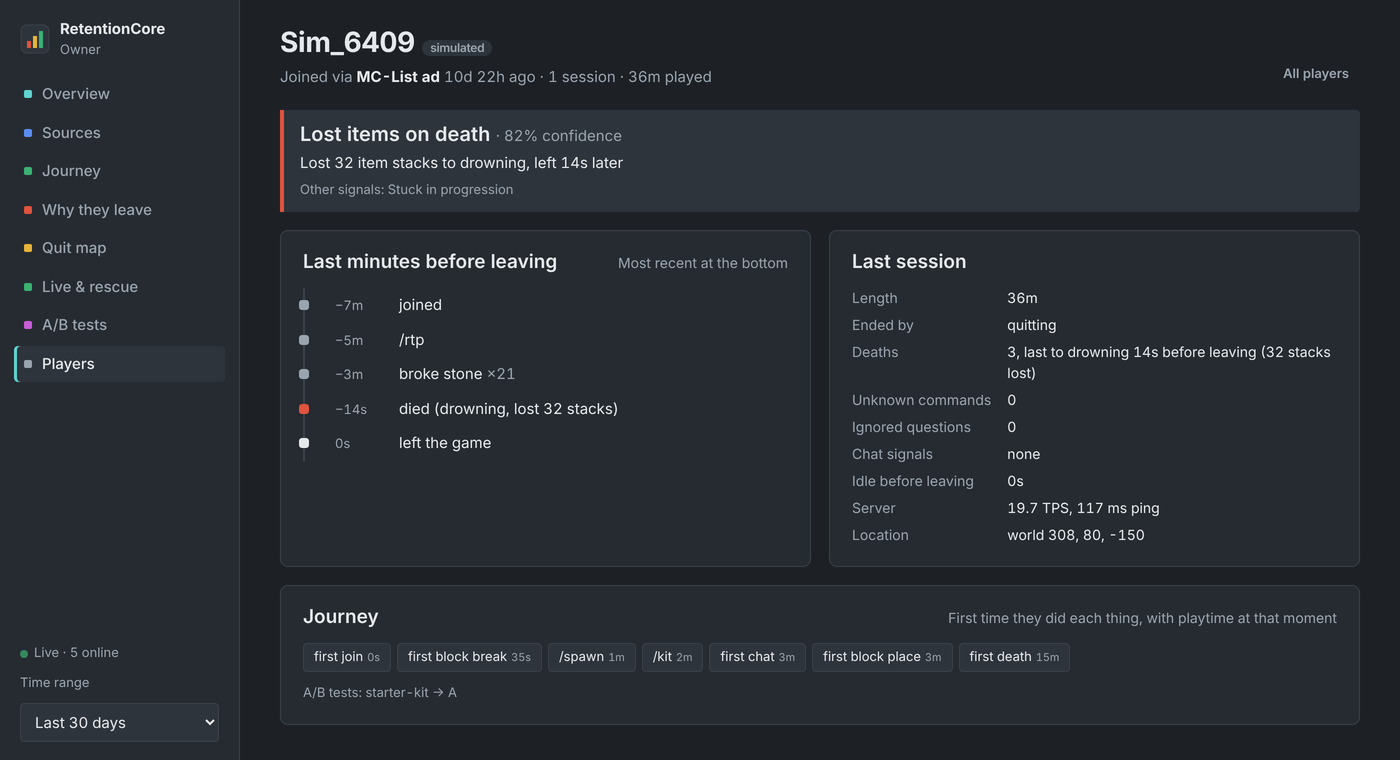
    Player page with the leave reason and a timeline of the last minutes before quitting

    Which ad brings players who stay

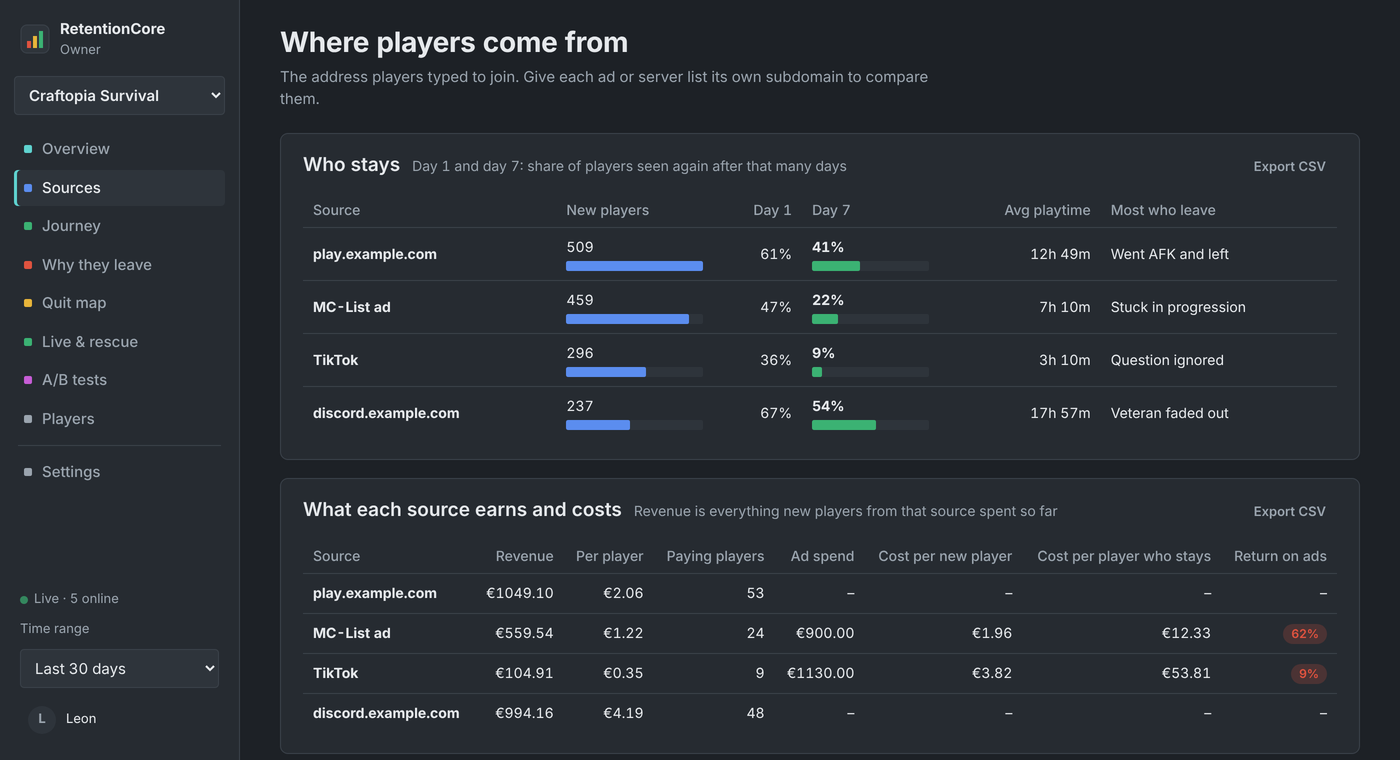
    Give every server list and ad its own subdomain. RetentionCore compares how many players each one brings, how many are still around after a week, what they spend in your store and what each staying player cost you.

    Sources table comparing retention, revenue and ad cost per server list

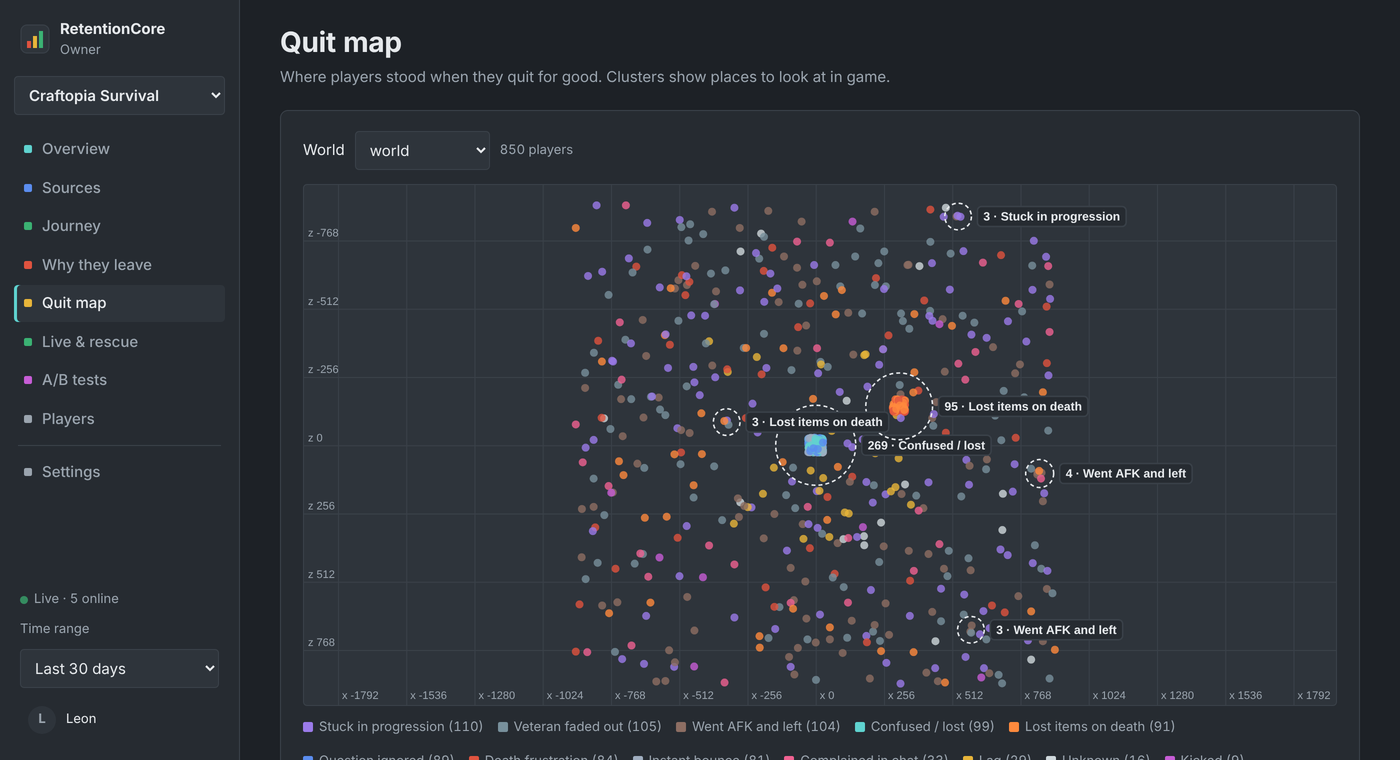
    Where on the map they give up

    Every lost player's last position goes on a map, and clusters are found for you. A ring around a lava canyon next to your /rtp zone, or around the spawn tutorial, tells you exactly where to look.

    Quit map with clusters of players who left around spawn and a lava canyon

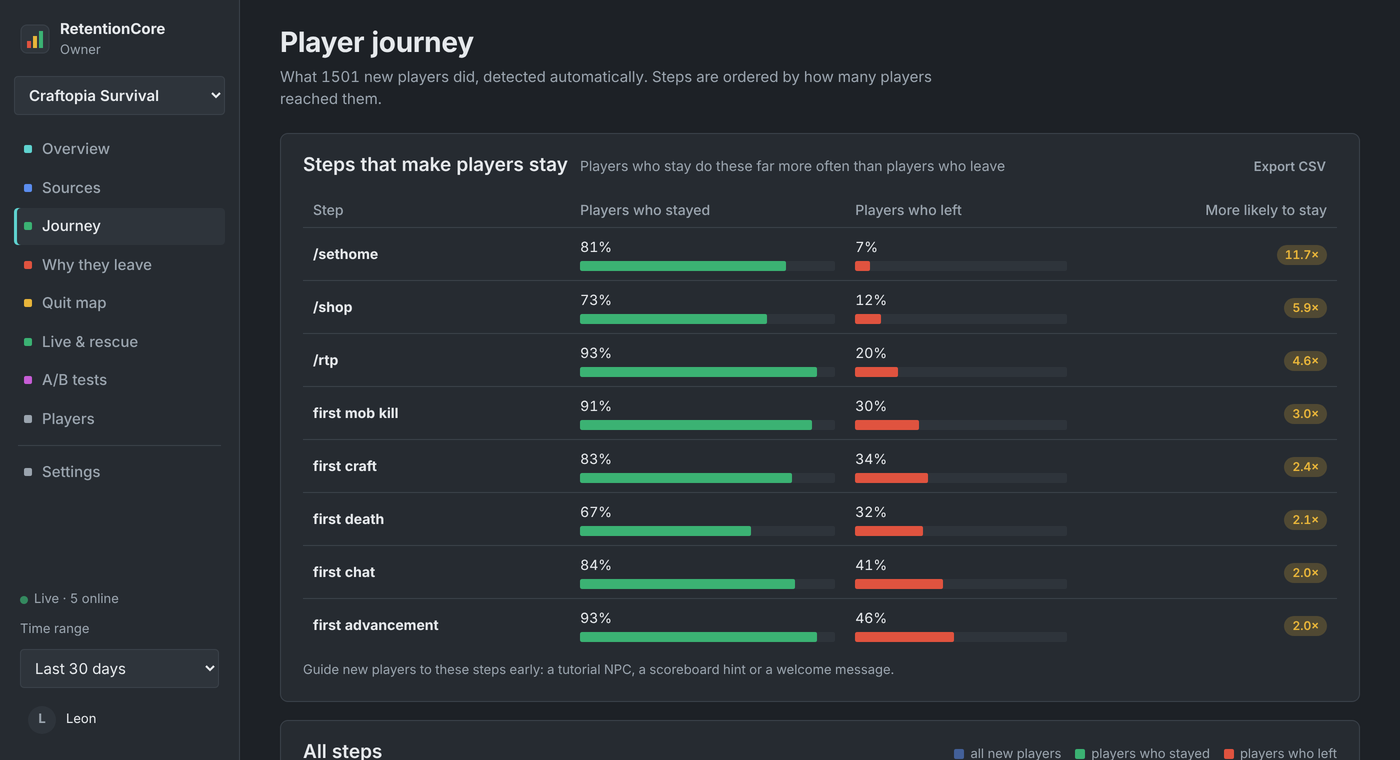
    The steps that make players stay

    No setup: every first chat, command, world and milestone is recorded automatically. RetentionCore then shows which steps players who stay almost always take, and players who leave almost never do, so you know what your tutorial should teach.

    Journey page listing key steps such as /sethome and /rtp with how much more likely players are to stay

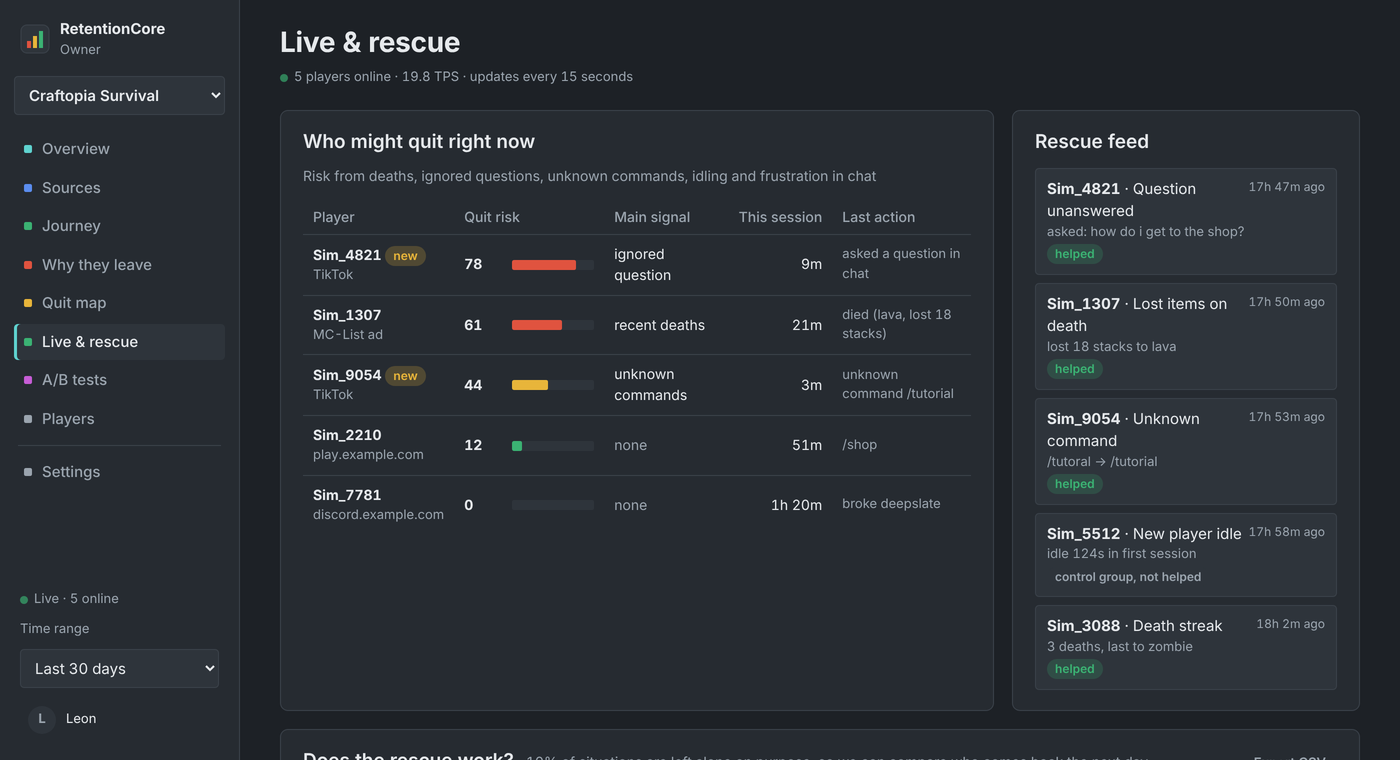
    Rescue players while they are still online

    When a new player asks something in chat and nobody answers within 30 seconds, your staff gets pinged in game and on Discord. A player who loses their items gets pointed to /back. A typo gets a "did you mean /warp?". Each action is yours to configure.

    To prove it works, a small share of situations is left alone on purpose. The panel compares how many helped and not-helped players come back, with a real significance test.

    Live view with quit risk per online player and the rescue feed

    Also included

    A/B tests

    Split new players between two starter kits, spawns or tutorials, and see which keeps more of them. Variants are exposed as permissions and PlaceholderAPI placeholders.

    Weekly Discord report

    Every Monday: retention, what changed, the biggest problem and a concrete suggestion, written in plain words.

    Team access

    Invite admins and moderators with a link. They log in with Discord and see the dashboard, with viewer or admin rights.

    Live quit risk

    A 0 to 100 score for every online player, also as %retentioncore_risk% for your scoreboard or staff tools.

    Velocity networks

    One jar for the proxy and every backend. Each backend is its own server in the panel, with the real join address forwarded by the proxy.

    Offline alerts

    A Discord message when a server stops sending data, and another when it is back.

    Your data stays yours

    The plugin keeps all raw data on your server. The panel only receives finished reports, and you can use the built-in dashboard without the panel at all.

    Set up in about two minutes

    1. Install the plugin

      Drop the jar into plugins and restart. On a Velocity network, put the same jar on the proxy and on every backend. Tracking starts right away.

    2. Add your server in the panel

      Log in with Discord and give the server a name. The panel shows a link command with your key.

    3. Run one command

      rc cloud link <key> in the console. The plugin only connects outward over HTTPS, so there is no port to open on your host.

    Questions

    Which servers are supported?

    Paper, Purpur and Spigot from 1.20.6 up to 26.3, Folia, and Velocity proxies. Deprecated server events are isolated, so a future server version can switch off a single signal but not the plugin.

    Does it work on a Velocity network?

    Yes. Put the same jar on the Velocity proxy and on every backend server. The backends do all the tracking and reporting; the proxy part only tells them which address each player joined with, so source tracking keeps working behind the proxy. BungeeCord backends are tracked too, without the join address.

    What data leaves my server?

    Finished reports (percentages, counts, the last 25 players who left) and the live view. Player details are fetched from your server only when someone on your team opens them. Chat messages and IP addresses are never stored.

    Will it slow my server down?

    No. Every database query and upload runs on its own background thread, and events only update small counters in memory.

    Can I try it without real players?

    Yes. /rc simulate 1000 fills a test server with simulated players so every report has data, and /rc clearsim removes them again.

    See it with a full server's worth of data.